
Live: start clipping in about a minute

Drop in the podcast. Get back the moments worth cutting.

Joltra reads the whole recording, ranks every moment that could stand on its own, and shows you why it picked each one. You keep the cut, the captions and the last word.

FREE PLAN, NO CARDCANCEL ANY MONTHFIRST BOARD IN MINUTES
91
Podcast · 0:12
84
Podcast · 0:16
79
Interview · 0:06
73
Podcast · 0:16
91
Podcast · 0:12
84
Podcast · 0:16
79
Interview · 0:06
73
Podcast · 0:16
88
Interview · 0:06
82
Podcast · 0:16
76
Podcast · 0:12
71
Podcast · 0:16
88
Interview · 0:06
82
Podcast · 0:16
76
Podcast · 0:12
71
Podcast · 0:16
The product / Live board

Built to be read, not just generated.

Founder podcast, episode 41 YouTube · 1:24:06
38 scanned · 6 worth cutting
One source, start to finish Tap a marker
00:00 1:24:06
#1 · 12:04
6 clips out Captioned · 1080p
#1 · 12:04 · 0:42
The money framework
Complete thoughtStrong openNo setup needed
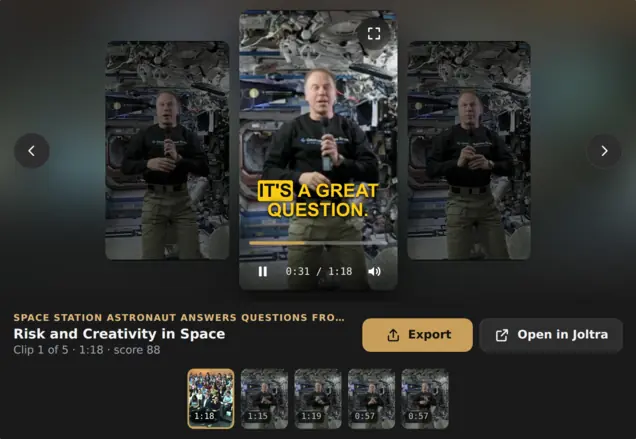
New · AI assistants

Clip from the chat. Joltra now works inside Claude and ChatGPT.

Paste a YouTube link in your assistant and ask for clips. Joltra tells you the minutes it will use, makes the clips and plays them right in the conversation. Everything lands in your Joltra library.

  1. In Claude, open Settings → Connectors → Add custom connector, name it Joltra and paste:https://joltra.io/mcp
  2. A Joltra page opens: sign in and choose Allow.It can make and read your clips. Never your password, email or billing.
  3. Ask for clips: “Make clips from <YouTube link>”They play right in the chat, and land in your Joltra library.
Joltra's clip player in an assistant chat, playing a captioned clip from a NASA space station video, with the other clips in a strip below
Real screenshot · Joltra’s player in the chat · NASA public-domain footage

The problem

Every recording already holds the clips. Nobody has an afternoon to go and find them.

38 moments in a 90 minute episode · see the board
38moments scanned in a 90 minute episode
6came back worth cutting, ranked best first
3formats exported from a single cut
Counted from the episode on the board above.
Capabilities

Your story. Your edit.
Every control in reach.

Take a closer look.
Choose a tool below to explore the editor, one detail at a time.

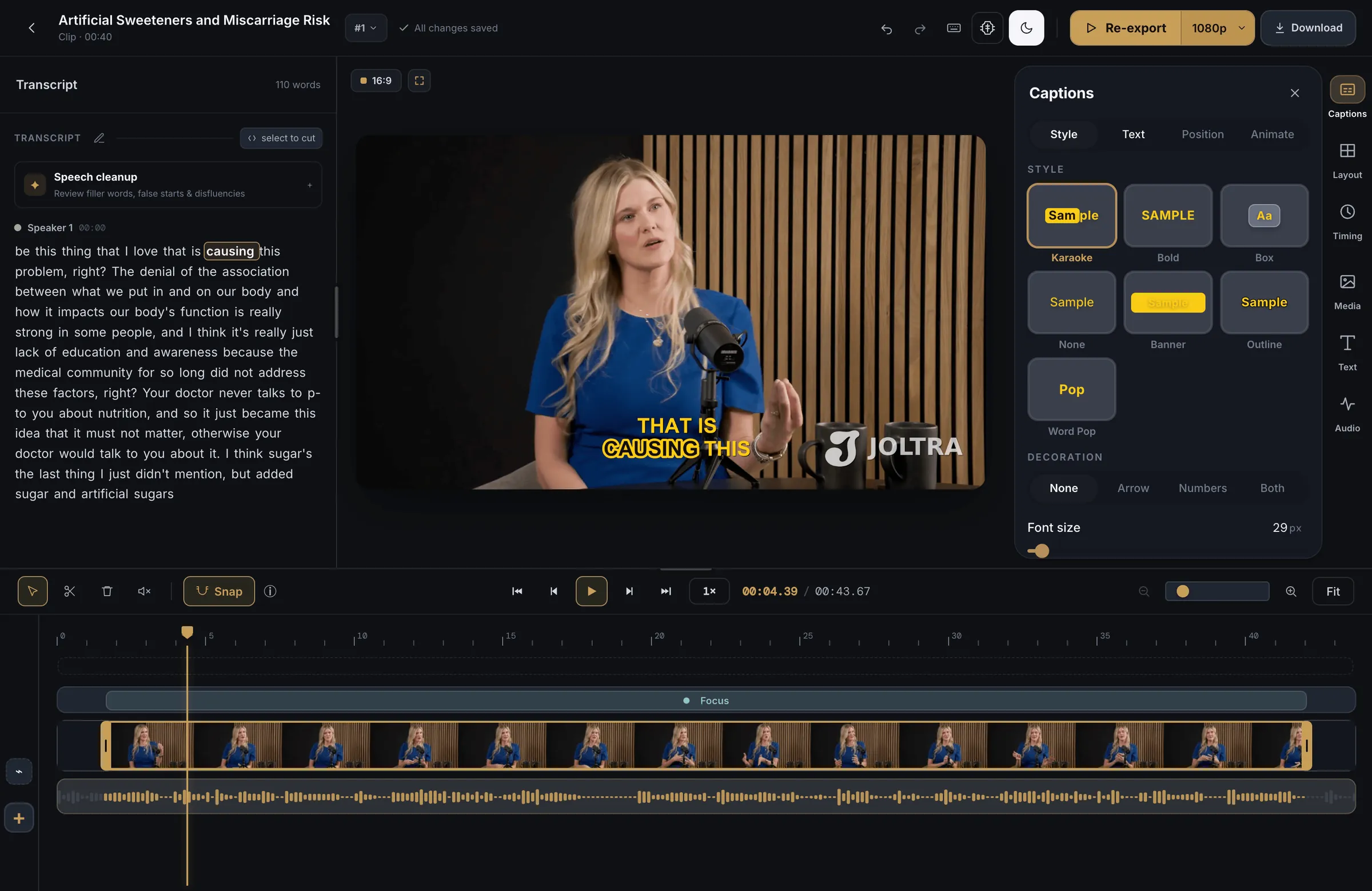
01 / Full editor

Plans

Pay for source time, not confusing credits.

Trial
$0
See what a board looks like on your own footage.
30 source minutes10 exports1080P, captionedScores and reasons24 hour retention
Start free
Starter
$9/mo
For a first channel, cut by the person who records it.
180 source minutes / mo60 exports1080P, captionedFull editor7 day retention
Choose Starter
CreatorMOST TAKEN
$25/mo
For weekly publishing, with the full editor.
750 source minutes / mo300 exports1440P, captionedCaption styles and titles14 day retention
Choose Creator
Studio
$79/mo
For teams and creators clipping several shows.
2,500 source minutes / mo850 exports1440P, captioned3 seats, 6 workspaces30 day retention
Choose Studio
Agency Workspace
$149/mo
For agencies and multi-brand operations.
5,000 source minutes / mo1,800 exports4K, captioned5 seats, 10 workspaces4K beta
Choose Agency Workspace

Minutes are counted from the length of your source video. A 60 minute podcast uses 60 minutes, however many clips come out of it. Trial exports carry a small Joltra mark; every paid plan exports clean by default.

Questions

Before you clip.
The honest
answers.

From your first upload to your final export. Here’s what to know.

SIX QUESTIONS. STRAIGHT ANSWERS.
What kind of videos work best?

Anything with people talking through real ideas: podcasts, interviews, webinars, streams, YouTube videos, client recordings. If there are opinions and stories in there, Joltra will find them.

Can I change the clip after Joltra makes it?

That is the whole idea. Joltra gives you a first pass. Move the in and out points, rewrite or retime captions, change the title and style, pick your format, then export.

Do you promise views?

No, and we would rather say so plainly. Joltra scores moments on hook strength, clarity, emotion and whether they stand alone. What gets posted is your call, and so is the result.

Can I use it for client work?

Yes. Plenty of our users are clippers, editors and small agencies. Studio and Agency Workspace add seats and workspaces so client work stays separated.

How are minutes counted?

From the length of your source video, not the clips. A 60 minute podcast uses 60 minutes, however many clips come out of it.

Does the free tier watermark exports?

Yes. Trial exports carry a small Joltra mark. Every paid plan exports clean by default, and you can choose to keep the mark in Settings.

Come clip with us.

Ask questions, show what you cut, and tell us what Joltra should do next. We are in the Discord every day.